 BIDOUCHE
StudioPro Video
StudioPro Video is an editing environment designed to bring together the main stages of audiovisual production in a straightforward way.
Quick overview
- Timeline editing with organisation of video and audio footage.
- Work on the image: corrections, visual enhancement and consistency between shots.
- Sound management directly within the video project: voice, music, ambience and levels.
- Titles, text, effects and graphics to build a clear presentation.
- Finalisation and export after checking the timeline and the overall render.
- An English version of the application is planned.
A timeline to build the story
Editing starts with choosing the footage and organising it on a timeline. StudioPro Video is designed to assemble shots, adjust their duration, prepare transitions and easily find the sequences of a project. A well-organised timeline helps shape the pacing, remove unnecessary passages and give the story a natural flow.
The different tracks make the edit easier to read: images, sound elements and creative additions are treated as components of a single project.
Improving the image without losing the thread of the edit
A good image must be consistent with the shots around it. Image work serves to visually balance sequences and to choose the corrections or effects that help the narration. The goal is not to pile up treatments, but to achieve a result that is uniform and pleasant to watch.
Sound is part of video editing
Dialogue, music and ambience influence how a video is understood. StudioPro Video combines image and sound work to set their respective place in the project: keeping a voice intelligible, preventing music from dominating and controlling sound transitions. The experience gained with the StudioPro Audio tools guides this attention to the listening result.
Text, titles, effects and graphics
Adding a title, an intertitle or on-screen information first serves the message. The workspaces dedicated to text and effects make it possible to prepare suitable graphics: identify a sequence, make information appear, add energy to a transition or build an introduction. The choice of effects works best when kept proportionate to the style of the video.
An interface suited to the creative stages
StudioPro Video relies on a readable working logic: edit the subject, improve the image, process the sound, add text and work on effects. A more complete view also lets you find the tools in a single space. This organisation aims to avoid overloading the screen while keeping editing operations accessible.
Preparing and checking the final result
Before export, checking the timeline, sound levels, text and sequences helps spot visible or audible problems. Export is the last stage of the project: it must faithfully reproduce the work done, according to the options available in the version used.
An editing space organised around the subject
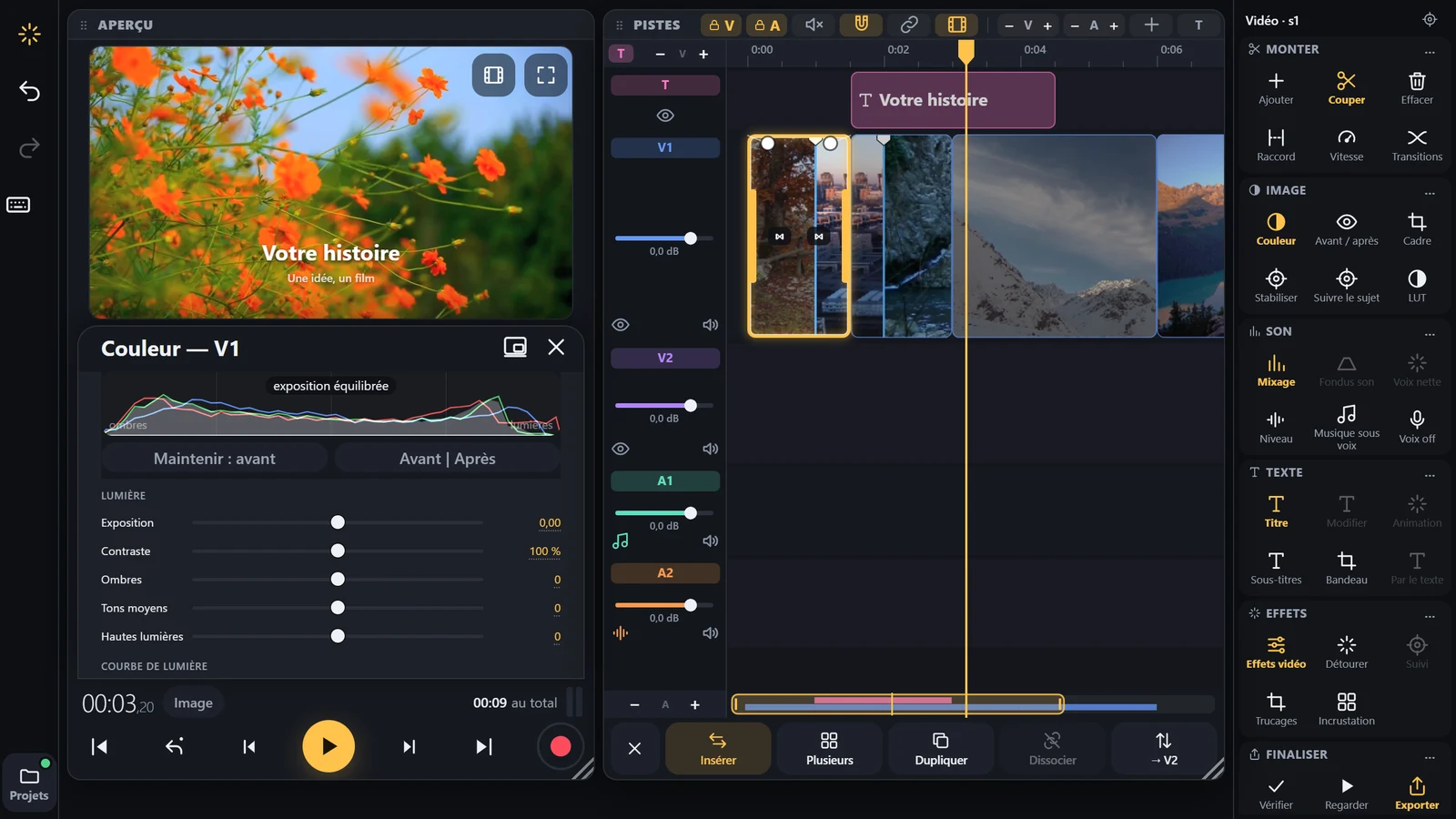
The application brings together a video preview, a timeline and action panels. This organisation makes it possible to follow the flow of a subject, place video and audio elements and prepare work on the different shots.
Work can begin with importing the sequences, continue with cutting and arranging them, then checking the transitions between shots. An overview helps to understand the pacing of the edit before moving on to finishing touches.
Image, sound, text and effects in one place
StudioPro Video is not limited to placing clips side by side. The workspaces presented in the interface cover in particular image, colour grading, sound, text, subtitles and video effects.
Depending on the need, the user can focus on the legibility of a title, the balance of a sound sequence, the colour of a shot or a transition. These actions serve the editing and the narration, rather than adding effects without purpose.
A creative path through to export
Finalisation is an important stage: checking the result, its pacing, the consistency of sound levels and the presentation of graphic elements. StudioPro Video provides a space dedicated to this review phase and to export.
The screenshot shown here displays a working interface with preview, tracks and contextual tools. It gives an overview of the project, but does not by itself constitute a demonstration of all its features.
For which projects?
The application is intended for creating presentation videos, demonstrations, educational content or personal edits. Information about the available versions and their terms of use will be provided when they are published.