 BIDOUCHE
StudioPro Audio
StudioPro Audio brings together the tools you need to work on a sound recording, organise an edit and build a mix, without separating technique from the pleasure of listening.
Quick overview
- Duplex: record a remote conversation, with your microphone and the other person's audio captured on separate tracks.
- Audio recording and import for voices, instruments, ambient sounds and spoken-word projects.
- Clip and waveform editing to cut, move, assemble and clean up.
- Multitrack mixing: levels, panning, stereo balance and checking the result.
- Effects and processing chains: EQ, compressor, de-esser, reverb, delay, saturation.
- Work on computer and smartphone, with an approach centred on listening, correction and export.
- An English version of the application is planned.
The video clip
StudioPro Audio presented in pictures and sound.
The application in pictures
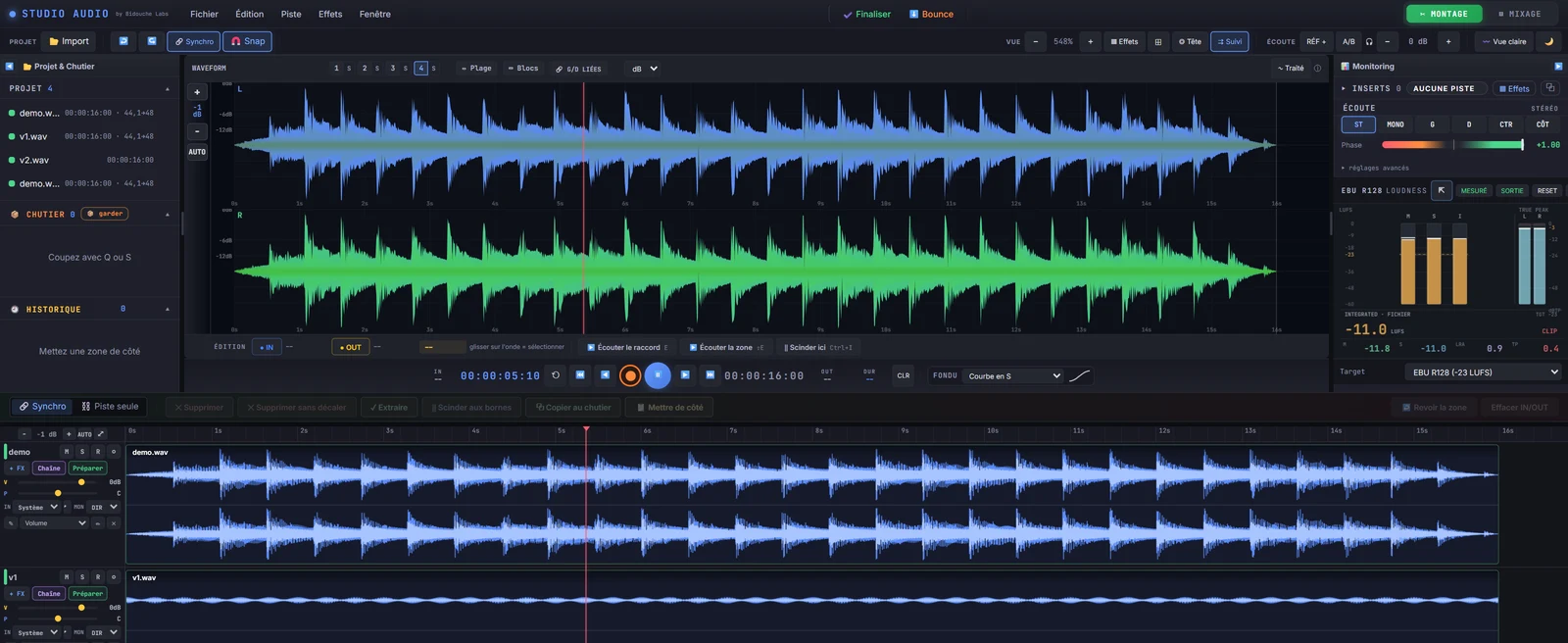
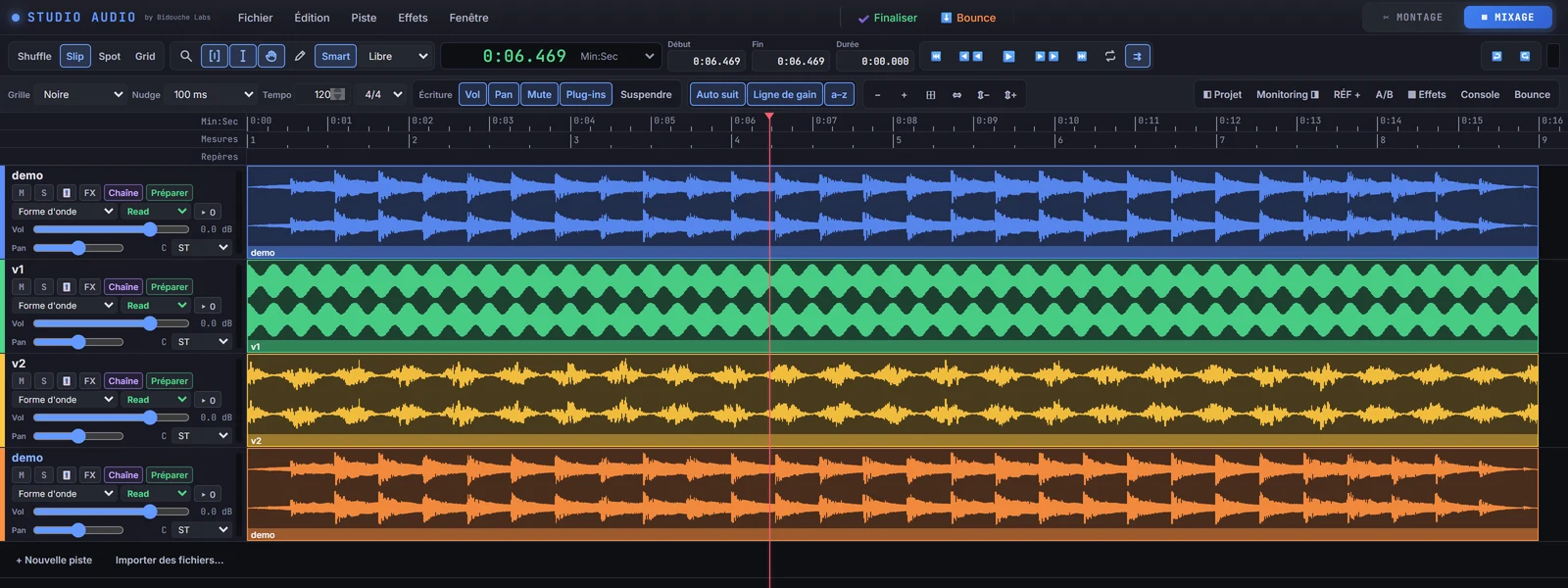
Screenshots from the project’s interface. Fictitious clips and waveforms have been added for demonstration purposes.
Audio recording: from take to project
StudioPro Audio brings together the essential steps of sound work: importing files, recording a voice or an instrument, listening to takes and preparing a project for editing. On a computer, the work can rely on an external audio interface and a multitrack organisation. On a smartphone, capture is deliberately kept simple, in mono or stereo, to favour reliability and sound quality.
Speech, singing, podcast, guitar, accordion, ambience or music: recording is the starting point of a workflow that continues through editing and mixing.
Duplex: recording a remote conversation
For an interview or a remote connection, StudioPro Audio lets you capture your voice and the other person’s voice on two separate tracks. Each side of the conversation thus remains accessible when editing: you can cut, balance and clean up each voice independently before the final mix.
Audio editing: cutting, assembling and organising tracks
Waveforms make takes visible on a timeline. They help you spot silences, attacks, breaths or passages to keep. StudioPro Audio lets you work on clips and tracks to organise an edit: selecting passages, cutting, moving, assembling and adjusting sound elements.
Editing on a smartphone remains a genuine working tool, including the ability to add a second track. This editing should not be confused with simultaneous multitrack recording, which is reserved for a suitable computer environment.
Multitrack mixing: levels, panning and sound balance
Mixing is about making several sound sources coexist. StudioPro Audio offers track-by-track work: adjusting volumes, placing sources in the stereo field, controlling their balance and building a coherent whole. A voice must remain intelligible, an instrument must keep its place, and ambiences must support the scene without masking what matters.
Level display, track controls and listening to the different sources let you correct the mix by ear. The goal is not only to reach a satisfactory sound level, but a result that is clear, natural and suited to the project.
Audio effects and processing chains
StudioPro Audio ties sound processing to the real needs of mixing. These include equalisation (EQ) to shape frequencies, the compressor to manage dynamics, the de-esser to tame certain sibilants, reverb to create a sense of space and delay to introduce controlled repeats.
Depending on the source and the desired result, other processing may come into play: low-cut, expander, saturation, exciter or limiter. Effects are not a collection of gadgets: they serve the clarity, colour and balance of the sound.
Effect chaining and processing order
The notion of a chain is essential: a voice may, for example, go through a low-cut, an equaliser, a compressor, a de-esser and then a reverb. The order of processing matters, because each stage acts on the signal received from the previous one. Chains make it easier to prepare consistent processing without removing the need to listen and adjust.
Links, routing and signal organisation
In an audio project, the links between tracks, effects and outputs determine the path of the sound. StudioPro Audio covers this routing and chaining work to keep a clear organisation, from the takes to the final result. Managing monitoring returns and the main output becomes particularly important when mixing on a computer with an audio interface.
This aspect should be described as a way of organising the signal, not as the promise of a universal hardware console: the exact possibilities depend on the version and the equipment used.
Mixing aid, sound reference and checking the result
To improve, it is useful to compare your mix with a sound model. StudioPro Audio explores this approach: listening to a reference, spotting differences in level, balance or colour, then revisiting the settings. Analysis aids, including those on effects and spectral interactions, support the user’s judgement rather than deciding in their place.
The work ends with a listening check and preparation of the audio export. The export must preserve signal quality and respect the project settings.
StudioPro Audio on computer and smartphone
The application addresses two complementary situations. The computer environment offers the space needed for a larger session, multitrack mixing and work with an external audio interface. The mobile version favors touch controls, simple mono/stereo capture and practical editing in the field. It is a single application family, presented here as a single card.
Who is StudioPro Audio for?
For musicians, podcasters, content creators, people who record interviews or ambient sounds, and anyone who wants to learn to edit and mix their audio. StudioPro Audio puts technical tools at the service of a simple goal: listen, understand, make adjustments and create a mix that sounds right.