 BIDOUCHE
StudioPro Pdf
StudioPro Pdf brings together practical tools to create and manipulate PDF documents, with an interface that emphasises visual actions.
Quick overview
- Create a document from a blank page or an existing PDF.
- Page handling: adding, deleting, duplicating, ordering and organising.
- Visual work on text, images and layout.
- Annotations, highlighting, corrections, notes and masked areas.
- Copy and paste, print preparation and document export.
- Available in English and in French.
Create a PDF document from a page
StudioPro Pdf is not limited to viewing existing files: the idea is to be able to start from a blank document, lay out the content and build a clear presentation. This approach is useful for preparing a handout, a worksheet, an administrative document or a small file.
Manipulating the pages of a document
Finding pages, reordering them and organising a set are essential operations in a PDF tool. The presentation should make these manipulations accessible without requiring a series of technical commands. The goal: to know where each element is and to see at once the changes made.
Work with text, images and annotations
Modern documents often mix paragraphs, visuals, boxes and elements to comment on. StudioPro Pdf is designed around handling them: selecting an area, placing it, adjusting an image and using annotation tools when they are relevant. Positioning precision and ease of use matter as much as the number of tools available.
Intuitive editing and copy-and-paste
Moving from one document to another should remain simple. Copy and paste, selection and adjustment of elements are important points of the ergonomics sought for StudioPro Pdf. A pleasant workflow relies on direct, understandable and reversible operations rather than repetitive manipulations.
Check before sharing or printing
A final read-through lets you check the page order, the layout, the presence of images and the legibility of the text. A PDF creation tool should help produce a clean, reusable document, whether it is intended for printing or digital sharing.
Create a document and organise its pages
Creating or editing a PDF should be straightforward. StudioPro Pdf offers a page-oriented workspace, with commands to create a document, add a blank page, open an existing PDF or insert a document into the current work.
The page preview provides reference points to check the structure of the document. It makes it possible to work on content intended for reading, printing or digital distribution.
Text, images and corrections
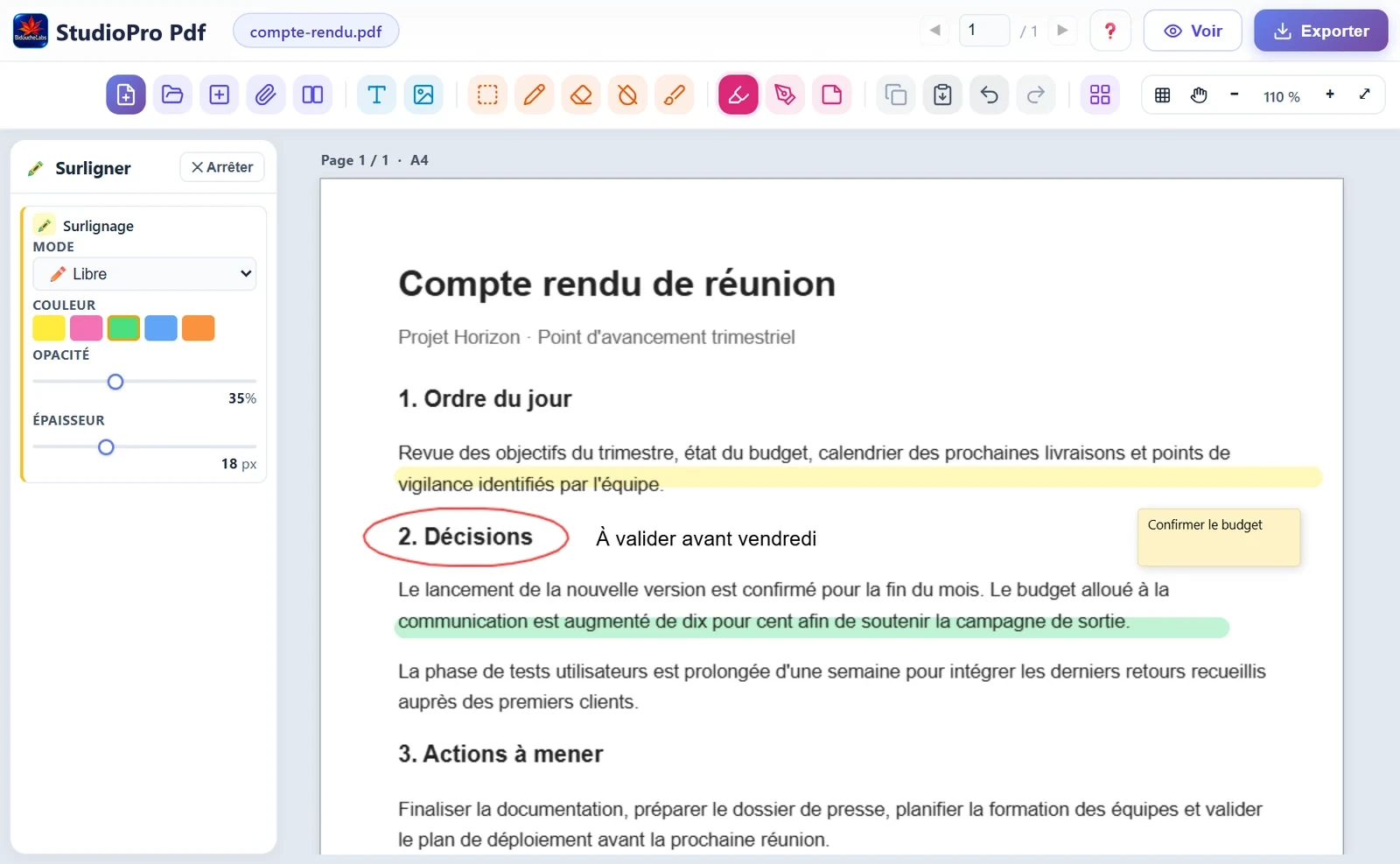
StudioPro Pdf provides commands to add text and images, make selections and act on existing elements. Tools for correction, masking, highlighting, drawing and notes are also part of its workspace.
These features address concrete uses: enriching a handout, annotating a document, highlighting a piece of information, preparing a worksheet or gathering several elements into a final file.
Precision and visual control
A grid, positioning guides and zoom commands support the placement of elements on the page. The aim is to achieve a readable, well-controlled layout without multiplying complex manipulations.
Working with PDFs also means checking the quality of the result. Before sharing or printing, it remains important to check the display, the pages and the exported file.
Which documents is it for?
StudioPro Pdf can meet the needs of administrative documents, teaching materials, worksheets and presentation documents. The screenshot illustrates the creation interface; the features and distribution terms will be detailed with the published version.